Developers need tools that enhance development efficiency and offer robust customization capabilities. While the Bonita Business Process Automation (BPA) platform offers full process applications development and integration capabilities, the new Bonita UI Builder - now included - offers a next-generation tool to integrate UI design seamlessly with those applications. It offers developers a streamlined way to create, iterate, and deploy highly customized and responsive UIs.
Let’s do a little dive into how the Bonita UI Builder can take you from a simple idea to an application connected to your data and your business logic in just minutes.
Bridge the gap between business process applications and UI design
Smooth end-to-end process applications need excellent front-end interfaces that are well integrated with the process behind the application.
Accelerate digital transformation with UIs that are ready for production quickly
The Bonita UI Builder supports efficient and scalable UI development and bridges the gap between business process alignment and cutting-edge UI design. It combines the simplicity of low code with the power of enterprise-grade integration and customization, to accelerate development and delivery.
- 80% faster development: Low code tooling accelerates UI creation! Use a simplified design process with a drag-and-drop interface, code completion, and advanced debugging tools.
- 10x faster iteration cycles: Rapid prototyping capabilities allow teams to iterate designs in record time, responding to feedback and evolving business needs without delays.
- Faster time-to-market: Save time with rapid prototyping and development.
Create UIs that are fully aligned with your business processes
- Deep integration with the Bonita ecosystem ensures that UIs align seamlessly with business processes, workflows, and data.
- The Bonita UI Builder supports both Bonita Runtime and Self-Contained Applications, making it the ideal choice for enterprises that prioritize synchronization between their UI and BPM systems.
Meet complex requirements without sacrificing usability
- The Bonita UI Builder empowers developers to create tailored UIs with more than 45 prebuilt widgets, support for custom JavaScript, and unrestricted drag-and-drop design capabilities.
- Whether you’re building a single-page app or a complex application dashboard, the Bonita UI Builder offers the flexibility to meet specific business needs.
- Scalable solutions: Build applications that evolve with the business.
- Enterprise flexibility: Meet complex requirements without sacrificing usability.
Empower application teams to build UIs that meet exact business needs, with no technical bottlenecks
- With its intuitive, low-code platform, the Bonita UI Builder makes UI design accessible to both technical and non-technical users.
- This approach democratizes UI creation, enabling cross-functional teams to contribute effectively.
Leverage modern, responsive UI frameworks within an intuitive drag-and-drop environment
- The Bonita UI Builder is built on a powerful framework (React) with dynamic, responsive interfaces so developers can deliver exceptional user experiences.
- Native debugging and JSON import/export options enhance flexibility, ensuring developers can focus on innovation.
Key features of the Bonita UI Builder
The features of the Bonita UI Builder support the diverse needs of enterprise UX developers.
- A drag-and-drop interface simplifies design with intuitive tools and visual editing.
- 45+ widgets include all the building blocks needed for complex UIs.
- Code completion and debugging streamlines coding with intelligent suggestions and native debugging.
- Custom JavaScript support offers advanced customization options for unique use cases.
- Seamless BPA integration ensures alignment with all Bonita-integrated workflows and information systems.
- Deployment as a custom Docker image is compatible with Bonita Runtime in both Bonita Cloud and on-premise environments.
How the Bonita UI Builder works
Getting started with the Bonita UI Builder is straightforward.
- Download and launch Bonita UI Builder. The Bonita UI Builder Docker image is in the Bonita Artifact Repository; set up your Docker environment and log in to get started.
- Design the interface. Use the drag-and-drop interface to select widgets, customize layouts, and apply styles.
- Connect to your processes. Link the UI elements to Bonita processes and workflows via APIs to ensure seamless functionality.
- Package and deploy. Export your interface and processes as a Docker image and deploy it within your chosen environment—on-premise or in the cloud.
Why yes, we have documentation on how to do all of this!
Have a look at the design interface of the Bonita UI Builder
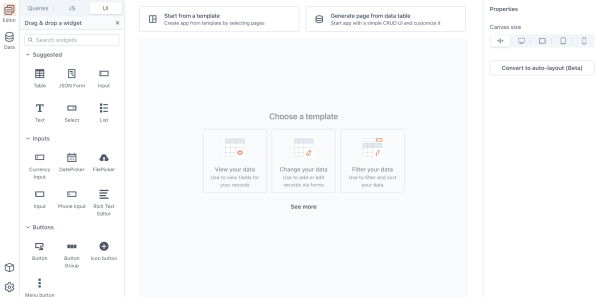
On the left are the widgets (visual elements) that you can drag and drop anywhere you want in the center “canvas” or design area. Here is also where to define API requests (using the Queries tab) that will connect the UI widgets to the Bonita process model.
On the right is where to configure the widget properties, and preview how the interface renders on different screen sizes.
Design the interface
Select a form widget, and drag and drop it in the central area:
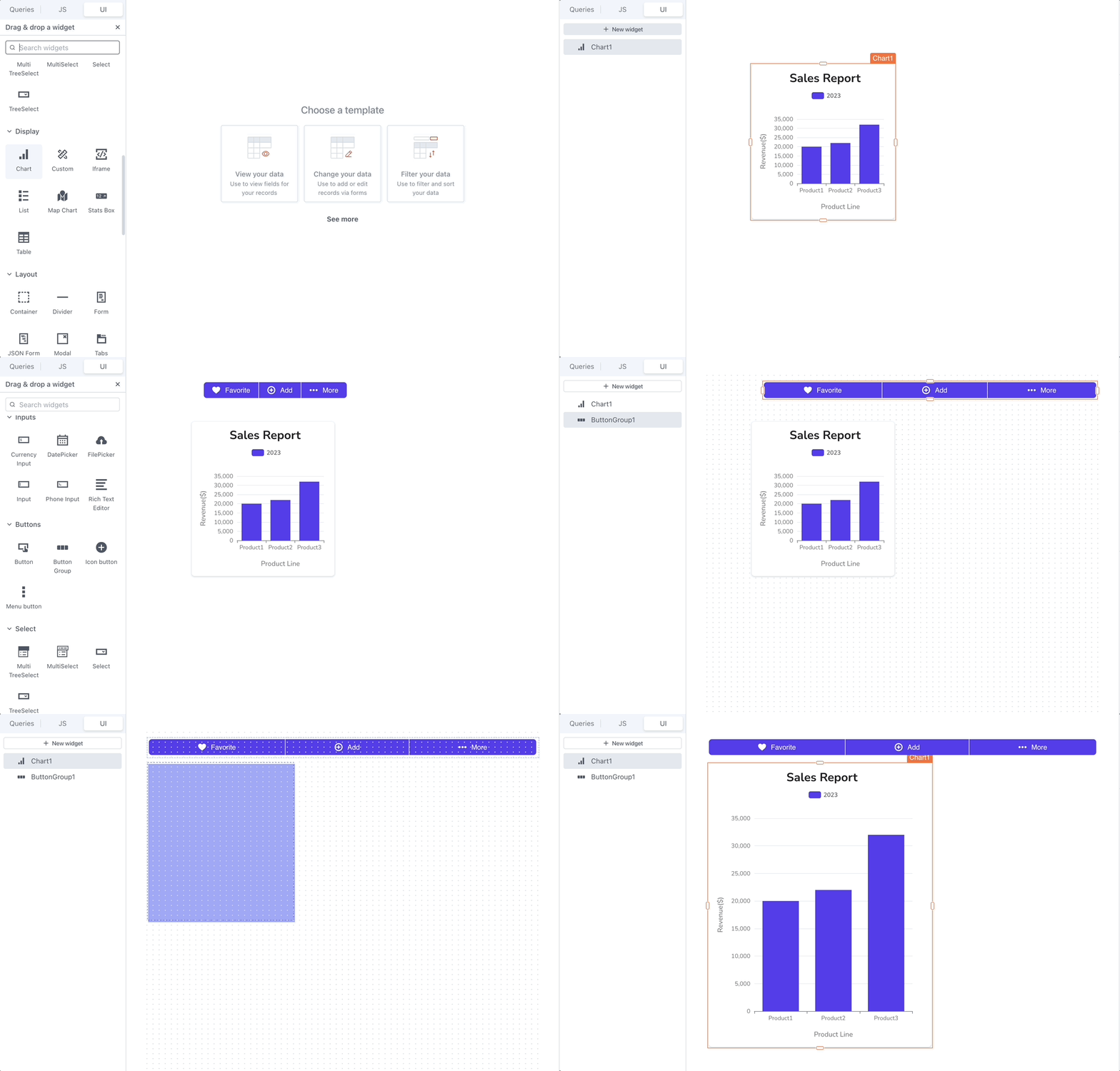
Drag and drop an input widget inside the form widget. This is what it should look like:
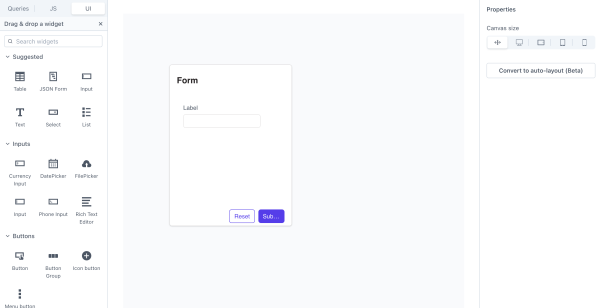
Voila! Forms, pages, and other user interfaces are that easy!

In brief
The Bonita UI Builder unites efficient technology with user-centric design principles, to empower developers to create interfaces that are functional and attractive.
Whether you're designing customer-facing dashboards or process applications for internal use, the Bonita UI Builder is an excellent ally in delivering exceptional user experiences. With its seamless integration into the Bonita ecosystem, it ensures that your applications are fully aligned with your business processes from the first touch, so you can stay ahead in an increasingly competitive market.
Explore the Bonita UI Builder today and transform the way you design and deploy UIs—faster, smarter, and better. Contact us if you want to know more about Bonita.
Schedule a personalized demo and see how Ofelia can transform your AI infrastructure.